
Why lookback windows create hidden budget errors
Attribution “lookback windows” define how long after an ad interaction a platform can still claim a conversion. The problem is that lookback settings differ by channel, by interaction type (click vs view), and sometimes by campaign objective. When teams compare ROAS or CPA across platforms without normalizing those settings, they are not comparing performance—they are comparing measurement rules.
A common mismatch is evaluating one channel on a 7-day click window while another uses a 28-day click window (and possibly includes view-through). The longer window will typically report more attributed conversions, especially for products with longer consideration cycles, higher price points, or multi-touch buying journeys. That additional credit can quietly pull budget toward the channel with the more generous window, even if incremental impact is similar or lower.
What “7-day vs 28-day” really changes in reporting
It shifts when conversions appear and who gets credit
With a 7-day window, a conversion that happens on day 10 after the click won’t be counted. With a 28-day window, it will. This matters in weekly pacing: a channel using 28-day attribution may show “strong” conversions for spend that happened weeks earlier, while a 7-day channel looks weaker because it stops counting sooner.
It changes the mix of conversions that get attributed
Short windows overweight fast decisions (brand search, retargeting, highly intent-driven audiences). Longer windows capture more delayed decisions (prospecting, video, mid-funnel content). Neither is “right” in isolation; they answer different questions. The issue is using them side-by-side as if they are equivalent.
It can amplify view-through effects
Some platforms attribute conversions after an impression even without a click. If one channel reports view-through conversions over a longer period and another reports only click-through over a shorter period, cross-channel comparisons skew further. Teams may think they are optimizing to the same KPI, but each platform is operationalizing it differently.
The lookback mismatch shows up as four budgeting pathologies
1) “One channel is suddenly outperforming” after a settings change
When a platform changes default attribution settings, reported conversions can jump or drop without any real behavior change. If budget decisions are tied directly to platform-reported ROAS, a settings shift can trigger unnecessary reallocations.
2) Weekly reporting makes long windows look better than they are
In weekly dashboards, 28-day attribution can keep “finding” conversions from older spend, making performance look stable even if recent efficiency is declining. A 7-day window is more sensitive to current performance but may undercount longer-lag conversions.
3) Prospecting gets underfunded in short-window comparisons
If upper-funnel campaigns are judged on 7-day click conversion counts, they can look uncompetitive versus retargeting or branded search. The result is a drift toward lower-funnel tactics that harvest existing demand rather than creating new demand.
4) Finance and growth teams disagree because they use different truths
Marketing may trust platform attribution. Finance may trust CRM-sourced revenue with first-touch/last-touch rules, or blended revenue trends. If each team reviews performance through different windows, the organization will struggle to align on what “efficient” means.
How to diagnose a lookback mismatch in your data
Inventory attribution settings by channel and interaction type
Create a simple table for each platform and campaign type:
- Click-through window (e.g., 7-day, 28-day)
- View-through window (if used)
- Any modeled or aggregated conversions (e.g., privacy-modeled)
- Attribution model used in-platform (if configurable)
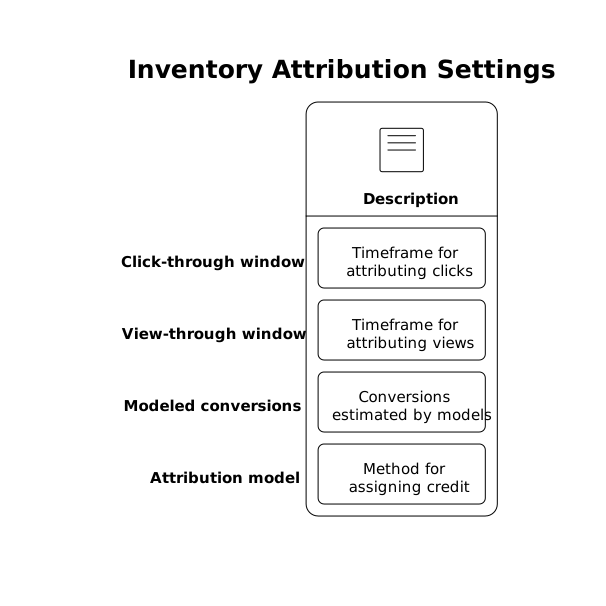
This inventory becomes a required input to any cross-channel performance comparison.
Measure conversion lag from first-party systems
Pull conversion timestamps from your analytics and CRM and compute “lag” (days between first tracked paid interaction and conversion, or between lead creation and closed-won). If a meaningful share of conversions occur after day 7, then 7-day windows will undercount compared with 28-day windows.
Compare performance on a normalized window
Pick a standard window for cross-channel decisioning—often 7-day click for fast-moving products, or 14–28 day for longer consideration cycles—and rebuild cross-channel KPIs consistently on top of first-party event data where possible. If you must use platform-reported conversions, at least align the attribution windows across platforms before interpreting differences.
Practical ways to make cross-channel comparisons fair
Use two sets of KPIs: “platform-optimized” and “budget-optimized”
Platforms are built to optimize within their own measurement environment. It can be operationally useful to keep platform-native KPIs for in-platform bidding and creative testing. Separately, maintain a budget-optimization view that uses consistent lookback rules across all channels. The mismatch becomes manageable when both views are explicit and documented.
Anchor budget decisions to a shared source of truth
Cross-channel decisions need standardized naming, consistent currency handling, and comparable conversion definitions. That is often a data engineering problem disguised as a marketing debate. A marketing data infrastructure layer such as Funnel.io helps teams collect and normalize ad, analytics, and CRM data so lookback assumptions can be evaluated with the same underlying dataset rather than conflicting exports.
Report lag-adjusted metrics for weekly pacing
If you run weekly reviews, consider lag-adjusted reporting: show conversions by the week of ad spend (cohorting), not just by the week the conversion is reported. This reduces the artificial advantage long windows get in short reporting cycles.
Document “what counts” in a lightweight measurement spec
Teams often do the hard work of fixing attribution issues and then lose the institutional memory. A short measurement spec should define the chosen decision window, whether view-through is included, and how CRM revenue is mapped back to campaigns. If your organization already uses structured processes to turn feedback into action, the same discipline applies here; the steps in a feedback escalation ladder can be adapted to make measurement changes visible, reviewed, and consistently applied.
Choosing the right standard window depends on the buying cycle
Short-cycle products
If most conversions happen within a few days, a 7-day click window can be a reasonable standard for decisioning. It will be more responsive to real performance changes, which matters for fast testing and tight pacing.
Long-cycle or high-consideration products
If conversions frequently happen after day 7, a 14- or 28-day window may better reflect the contribution of prospecting and mid-funnel campaigns. In these cases, it is also useful to separate “lead” conversion windows from “revenue” windows, since revenue recognition lags further.
What to do when platforms cannot be aligned perfectly
Some platforms restrict lookback controls or apply modeled conversions differently. When perfect alignment isn’t possible, the goal is to make differences explicit and minimize their impact:
- State each channel’s attribution rules directly in the dashboard.
- Use first-party event and CRM data for cross-channel comparisons whenever feasible.
- Run holdout or geo experiments for major budget shifts, especially when reported ROAS diverges sharply by platform.
- Re-check settings after major platform updates, new campaign types, or tracking changes.
Lookback windows are not a minor configuration detail. They are a measurement contract. If the contract differs across channels, budget decisions will drift—even when teams believe they are being rigorous.
Vertical Video